Core academics
Mathematics · Reading & Comprehension · Writing · English as a foreign language
 by

ROOM FOR CURIOSITY · GRADES 1–6
Read, work with numbers and make sense of new ideas with Sparky. SchoolQuest brings prepared practice and clear explanations in five languages to learning at home and on the go.
Explore first, then decide. Grown-ups set up the account and choose a plan.
TRY A REAL LEARNING EXAMPLE

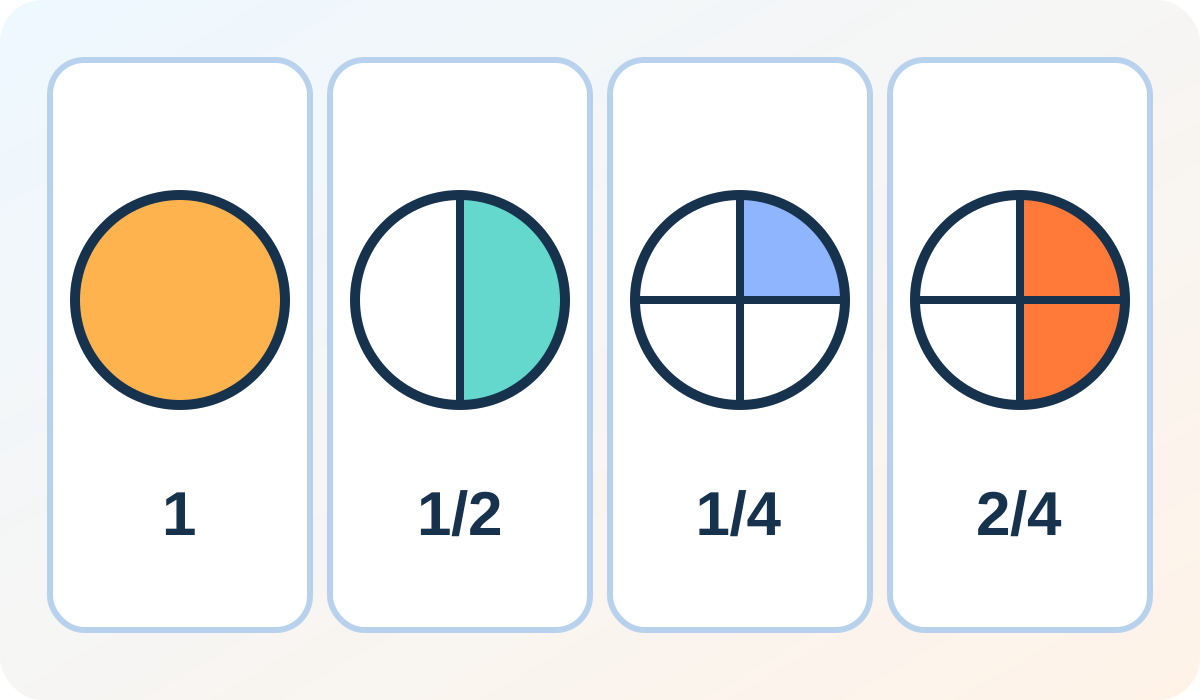
An example from prepared Grade 1–2 practice. No learning progress is saved here.
A look inside learning
Choose a grade, a subject and a skill. Practice brings together tasks, illustrated examples and answer feedback.
Mathematics · Reading & Comprehension · Writing · English as a foreign language
Countries & Geography · History · Civics & Media Literacy
Animals · Biology · Physics · Chemistry
Coding · Art & Design · AI Literacy · Music
Life Skills · Financial Literacy & Everyday Economics · Health & Wellbeing · Sport and movement
SchoolQuest
Create an adult account, review the scope and plans, then set up a local learning place.
Start with an avatar, a suitable grade, a language and a skill to practise.
Try tasks, look at explanations and work through new ideas together when needed.
For parents
Stay alongside your child's learning and manage the important settings in the parent area.
Larger text and shorter steps can be selected for each learning place.
Local practice needs no child name, date of birth or uploaded child photo.
Practice totals stay in this browser. A private backup helps you move devices; there is no automatic cloud sync.
Plans and scope
One learning place or up to four: take time to compare the scope. Price, renewal and cancellation rules appear before payment.
$29/month · $229/year
Plans and scope$49/month · $399/year
Plans and scopeCreating an adult account is free. Prepared paid practice requires an active SchoolQuest plan; a free account alone does not unlock it.
What this version includesThe app offers exercises compatible with the chosen grade and cycles through the selected skill. Prepared explanations and answer feedback help with practice; open written work may need an adult to review it.
Creating an adult account is free. Prepared paid practice requires an active SchoolQuest plan; a free account alone does not unlock it.
Settings and practice totals stay in this browser’s local storage, separate from the adult account. There is no automatic cloud sync or account recovery of this local progress. A parent can download a JSON backup and deliberately import it to replace local places. Keep the file private: it can reveal learning activity. Clearing browser data, private browsing or changing devices can lose progress. If storage fails, changes may last only for the open session.
This version provides local prepared practice. It does not include a personalised cloud AI tutor, automatically adaptive daily plans, cloud learning sync, new portfolios or printable weekly parent reports. SchoolQuest is a learning aid supervised by adults and does not replace a school, qualified teaching, local education obligations or professional advice.
Settings, adding a place, backup, import and reset require a fresh online check of authenticated parent mode. The server PIN lock remains available. If sign-in expires, the parent lock is on or the status check is unavailable, those parent actions stay closed. Local practice storage is not encryption or protection against someone who controls the device or its browser tools.